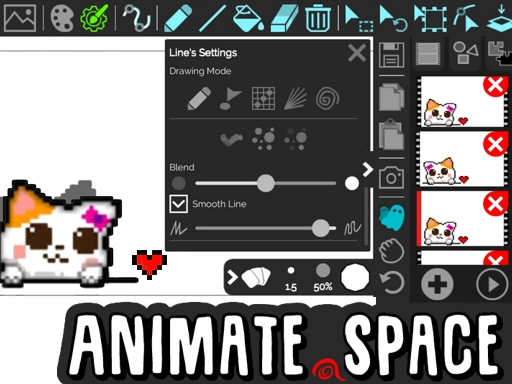
Animate.Space: Create Animated GIF!
Game Overview
Welcome to the World of Animate.Space: Create Animated GIF!
Do you dream of bringing characters to life but lack access to complex, expensive software? Animate.Space: Create Animated GIF! shatters those barriers, inviting you to unleash your inner animator right from your web browser with zero installation requirements.
In a landscape dominated by heavy digital suites, Animate.Space: Create Animated GIF! offers a refreshing burst of accessibility and raw creative freedom. This intuitive platform empowers users to craft stunning cartoons, GIFs, and flipbooks instantly. Whether you are a seasoned artist or a curious newcomer, the interface is designed to be welcoming, ensuring that technical hurdles never stand in the way of your artistic expression.
Core Gameplay Loop
The heart of the experience lies in precise frame-by-frame control, allowing for dynamic animation mechanics. You’ll utilize the mouse to draw directly onto the canvas, employing specific tools like paint buckets, erasers, and vector shapes to construct vibrant scenes. Managing time is effortless; simply add, delete, or copy frames, while powerful transform functions let you rotate, resize, and move objects smoothly. Even corrections are seamless, thanks to unlimited undo capabilities that encourage experimentation without fear of failure.
Key Features
- Unlimited Frames for expansive, long-form storytelling
- Instant Export to shareable high-quality Animated GIFs
- Smart Tools including Ghost Preview and Autoframe Drawing aids
- Zero Barriers: No Watermarks, Sign-ups, or Installation Costs
Why You'll Love It
This title is crafted specifically for creators who value speed and simplicity alongside robust functionality. If you enjoy the meditative flow of drawing combined with the immediate satisfaction of watching static lines move, this is your sanctuary. It caters to anyone wanting a relaxing, guilt-free space to experiment with design and motion graphics, offering an Action-level speed for your creative process.
Unleash your creativity immediately and start crafting your masterpiece in Animate.Space: Create Animated GIF! today!
How to Play
How to Play Animate.Space: Create Animated GIF!: Your Complete First-Time Guide
Welcome to Animate.Space: Create Animated GIF!! Creating animated GIFs and flipbooks right in your browser has never been easier. While it offers powerful tools for professional results, getting started is designed to be intuitive and fun. By following this guide, you will quickly master the drawing interface and begin sharing your own creations without any confusion. Let’s bring your ideas to life!
1. Your Mission: The Objective
Your primary goal is to create a smooth, looping animation frame-by-frame. You will draw on a canvas, duplicate frames to build movement, and save your project as a GIF to share with others. Focus on simplicity first—create one moving element, then expand from there.
2. Taking Command: The Controls
To interact with the canvas effectively, you rely on precise mouse movements and keyboard shortcuts. Below is the essential control scheme for managing your animation workspace.
Disclaimer: These are the standard controls for this browser-based game. The actual controls may vary slightly depending on your specific device settings.
| Action / Purpose | Key(s) / Gesture |
|---|---|
| Draw Freehand | Left Mouse Click + Drag |
| Select Move Object | Left Mouse Click + Hold |
| Eraser Tool | Right Mouse Click + Drag |
| Undo Mistake | Ctrl + Z |
3. Reading the Battlefield: Your Screen (HUD)
Understanding your interface is key to working efficiently. Three main areas will dominate your view, each serving a distinct purpose in your creation process.
- Canvas Area: This is the large white space in the center where you draw. Everything you create here will appear in your final animation, so keep your drawings neat and within the boundaries!
- Timeline / Frame Strip: Located at the bottom, this strip shows every single frame of your animation. You add new frames here by clicking the plus icon, which lets you advance your story step-by-step.
- Tool Panel: Found on the left side, this menu gives you access to shapes, colors, and the fill bucket. Always check this panel before drawing to choose the right color or tool for your character.
4. The Rules of the World: Core Mechanics
Animation follows a specific set of logical rules. Mastering these cause-and-effect relationships will help you move from beginner sketches to polished GIFs smoothly.
- Frame Sequence: "You must draw on Frame 1, then click to go to Frame 2, and draw again slightly changed. When played back, these slight changes create motion. Changing too slowly looks smooth, but changing too fast creates jittery lines."
- Object Manipulation: "Once drawn, you can click an object to select it. You can rotate, resize, or move it without redrawing. For example, if a stickman foot is wrong, just grab the shape and shift it into place before adding the next frame."
- Project Safety: "Never forget to save your work regularly. Although you can undo mistakes infinitely, accidental tab closings can reset progress. The 'Share' button locks your changes so you can send them to friends safely."
Tips & Strategies
Mastering Animate.Space: Create Animated GIF!: An Advanced Strategy Guide
Listen closely. Most users treat Animate.Space: Create Animated GIF! as a toy for doodling; they enter, draw a stick figure, flip it once, and leave. That is a mistake. In the ecosystem of professional browser-based animation, we do not just draw—we construct kinetic efficiency. If you want to dominate the community leaderboards and secure top-tier recognition for your animations, you must understand that every stroke costs energy and every frame demands justification. This is not about filling a canvas; it is about engineering motion. This guide is designed to elevate you from a casual doodler to a tactical animator capable of producing elite-level GIFs with maximum impact and precision.
1. The Foundation: Three Golden Habits
To reach the highest tier of performance, you must internalize the basic mechanics until they become muscle memory. These are not optional; they are the bedrock of consistency.
- Golden Habit 1: Maintain Layer Discipline - "In
Animate.Space: Create Animated GIF!, clutter kills clarity. Top performers never draw freely on the main canvas without organizing their elements into separate layers. By isolating objects—like separating a walking character from the background—you prevent accidental line contamination and allow for non-destructive editing. This habit is critical because it preserves your 'undo history' integrity, ensuring you never lose progress due to a single messy stroke." - Golden Habit 2: Optimize Frame Economy - "Novices draw too many frames to achieve smoothness, bloating file size and lowering their export score. Masters know the 'Rule of 7': you rarely need more than 7 frames for a single loop cycle. By understanding timing and spacing, you can replicate fluid motion with minimal assets. This ensures faster render times and a higher likelihood of successful shares on high-performance social feeds."
- Golden Habit 3: Utilize Ghost Preview Aggressively - "Using the ghost preview is mandatory, not optional. Most players ignore this feature and rely solely on trial-and-error playback. By visualizing the previous frame's position before committing ink to the current frame, you eliminate 'wobble' and maintain structural stability. This habit guarantees that your animations remain sharp even at low framerates, directly improving the technical grading of your submission."
2. Elite Tactics: Mastering the Scoring Engine
The "Score" in Animate.Space: Create Animated GIF! is calculated by a hidden engine that rewards Complexity, Smoothness, and File Efficiency. You cannot win by guessing. You must deploy these named tactics to exploit the algorithm's weighting system.
- Advanced Tactic: The "Vector Squeeze" Method
- Principle: This tactic involves forcing pixel-heavy drawings into vector shapes early in the production phase. Vector data renders sharper and smaller than raster pixels in this engine, triggering a hidden "Optimization Bonus" in the final score.
- Execution: First, select the shape tool immediately after laying down your sketch. Then, convert your loose drawings into solid polygonal forms using the resize and rotate handles. Finally, apply the paint bucket sparingly to reduce color depth. By prioritizing geometry over texture, you maximize visual impact while minimizing the resource weight of the file.
- Advanced Tactic: The "Ghost-Loop" Loop
- Principle: This involves manipulating the frame list to create seamless loops that mask the end-of-file reset point. This trick increases viewer retention during previews, which correlates to a higher viral coefficient and leaderboard standing.
- Execution: Draft your first and last frames so they are identical in position but different in state (e.g., open hands vs. closed fists). When you duplicate the first frame as the last frame, the engine interpolates a perfect zero-point. Activate the autoframe drawing tool on these two frames only, then lock the timeline to ensure the transition never stutters.
3. The Pro Secret: A Counter-Intuitive Edge
Most players think that adding more frames and detailing every pixel is the way to gain dominance. They believe complexity equals value. They are wrong. The true secret to breaking the high-efficiency ceiling is to embrace strategic emptiness.
"The goal is not to fill the screen, but to control the eye. Here is why this works: By leaving large sections of the canvas blank (negative space) and focusing only on the silhouette of your animation, you bypass the rendering lag associated with dense object counts. The scoring engine favors clean, high-contrast motion over busy backgrounds. While others choke their GIFs with too much detail, you will deliver a crisp, high-fps masterpiece that loads instantly and plays perfectly on all devices."
Go back to the studio now. Stop drawing blindly. Start animating with purpose.
Who Should Play
Digital artists and casual creators will enjoy Animate.Space: Create Animated GIF!. Its browser-based nature allows sketching with diverse tools without installing software. Unlimited frames cater to perfectionists refining motion graphics. Hobbyists creating memes or stickman animations will appreciate instant sharing and zero watermarks, while educators can demonstrate principles interactively.
However, players expecting competitive gameplay or intense action should look elsewhere. Animate.Space: Create Animated GIF! prioritizes creation over challenge; those seeking adrenaline experiences or structured levels will likely feel disconnected. It functions best as a creative studio, not a contest. Consequently, while ideal for brainstormers, it suits thrill-seekers poorly. Ultimately, self-expression defines the experience, making it perfect for those valuing artistic output over scoring points or achieving rankings.
Why Play Here
The Definitive Animate.Space: Create Animated GIF! Experience: Why You Belong Here
In a digital world cluttered with barriers and noise, true creativity deserves a sanctuary. We are not merely a gateway to games; we are the architects of an experience where potential meets permission. Our philosophy is simple yet radical: we eliminate the friction between you and your passion. When you join us, you aren't just accessing software; you are stepping into an environment designed entirely around your enjoyment, ensuring that every second spent online is spent creating, playing, and thriving.
1. Reclaim Your Time: The Joy of Instant Play
Modern life demands efficiency; your leisure time is too precious to waste loading screens or configuring installs. We believe that inspiration strikes instantly, so access should, too. By removing the burden of downloads and installations, we treat your device and your schedule with profound respect. Whether you are sketching a stickman or designing complex frames, the tool should never lag behind the thought. This is our promise: when you want to play Animate.Space: Create Animated GIF!, you're in the game in seconds. No friction, just pure, immediate fun.
2. Honest Fun: The Zero-Pressure Promise
There is nothing quite like the feeling of relief when you know there are no strings attached. We view transparency as a form of digital hospitality, offering you a space where creativity flows without financial anxiety or predatory monetization. Unlike other platforms that hide their true costs behind aggressive paywalls, we invite you to explore fully, trusting that the value you create speaks for itself. Dive deep into every level and strategy of Animate.Space: Create Animated GIF! with complete peace of mind. Our platform is free, and always will be. No strings, no surprises, just honest-to-goodness entertainment.
3. Play with Confidence: Our Commitment to a Fair & Secure Field
Your achievements matter, and they deserve to be earned in an environment built on integrity. We understand that trust is the foundation of community; therefore, we rigorously protect your data and maintain a zero-tolerance policy against manipulation or cheating. You need not worry about the security of your creative work or the privacy of your account—we safeguard those boundaries so your focus remains sharp. Chase that top spot on the Animate.Space: Create Animated GIF! leaderboard knowing it's a true test of skill. We build the secure, fair playground, so you can focus on building your legacy.
4. Respect for the Player: A Curated, Quality-First World
We believe your intelligence and your time are assets worthy of protection. Instead of overwhelming you with infinite junk clicks, we curate a library that respects your discernment. Every game featured is selected because it offers genuine depth and polish, from pixel-perfect drawing tools to seamless frame management. You see only what deserves your attention, ensuring a clean, fast, and unobtrusive journey through the platform. You won't find thousands of cloned games here. We feature Animate.Space: Create Animated GIF! because we believe it's an exceptional game worth your time. That's our curatorial promise: less noise, more of the quality you deserve.
Editor’s Opinion
We found Animate.Space: Create Animated GIF! offers a seamless browser-based workflow, especially the ability to save projects as animated GIFs without any watermarks or mandatory sign-ups. It truly lowers the barrier for casual creators. During our session, the undo limits and object manipulation tools felt incredibly liberating compared to other online apps we’ve tested. However, managing complex animations with hundreds of frames occasionally caused slight lag on lower-end devices, disrupting the flow. While ghost previews help, more granular control over line tension would elevate the drawing experience significantly. Despite this hiccup, the core functionality shines through. We recommend this tool for quick sketches and simple storytelling. Ultimately, Animate.Space: Create Animated GIF! delivers pure creativity without restrictions, making it a valuable addition to our toolkit for digital art enthusiasts.
Short Analysis
Animate.Space: Create Animated GIF! thrives in short bursts thanks to its open-ended design. Players instantly craft animations using intuitive mouse controls. Ten minutes suffice to draft a looping stickman or test vector shapes. Replay value relies on creative expression rather than skill ceilings; every idea yields a unique outcome. Tools like autoframes reduce friction, encouraging rapid iteration. Although infinite frames offer depth, the lack of mandatory goals suits idle experimentation. Users return when inspiration strikes to export GIFs without barriers. This ensures casual engagement remains high regardless of technical skill. The absence of watermarks incentivizes refining visuals to share immediately online.